The following review guide and summary was written entirely by me. These are practice notes, questions, helpful hints, and other things that I found applicable to study for and take the expert certification from the Archer Academy.
The test description followed below, is taken from the Academy website. It’s important to understand what will be covered, and what’s required. Prior to taking this exam I have been working at a company for 2 years, and received my Associate and Specialist Certificate. I think some of the best practice that I got preparing for this exam was working within a group, troubleshooting, and supporting the platform.
At the time of writing this, I have passed the expert level certification by reviewing the Admin 1 and 2 course presentations through an Archer instructor, taking practice exams, and taking my own notes on the platform.
- The Exam – Archer Certified Administrator Expert About
- Archer Platform Data Structure
The Exam – Archer Certified Administrator Expert About
The Archer Certified Administrator – Expert Examination validates the understanding and skills required to perform advanced configuration, administration, and maintenance tasks in an Archer environment.
The Archer Certified Administrator – Expert examination focuses on the critical job functions an individual would typically be expected to perform with competence when providing Archer deployment and administrative services. An Expert Administrator is a person who works as an Archer administrator, technical support, professional services, or other technical implementation role using Archer. Certification is critical in a competitive tech world and offers professionals an advantage in the hiring process.
During the exam you will not be allowed to open an Archer training course. Trying to open a second tab will close the exam and use one of your two exam attempts.
If you skip a question, make note of the question number so you can easily find and return to the question before final submission.The exam consists of 70 questions and has a 90-minute time limit.
The certification expires after two years – keep your most advanced certification up to date to stay current
Archer Platform Data Structure
ChatGPT Study Outline
For the following study guide this time around, when drafting up this post I actually wanted to utilize some tools that we have available. So naturally I went to all of my AI assistants for a little help after I studied. Notice that word, AFTER. Your not going to get any benefit if you throw everything into an AI tool and just read what it spits back. I typically use these tools better help understand the concepts I’m trying to learn.
ChatGPT was not the greatest at digesting the whole presentation in detail, but it created enough of any outline with a few key bullet points to get started on this draft, and help interconnect all the points of the Admin 2 guide together to plan out what I should study. I have added a few of the notes that I found most useful or things that I just needed to remember and edited the below.
Surprisingly all other AI assistants that I tried this on, either had a limit or required the use of an upgrade to a paid feature to support this analysis.
Archer Platform Admin Level II Study Guide
Course Objectives:
By the end of this course, participants will be able to:
- Import existing data into multi-leveled Archer applications and questionnaires.
- Integrate Archer with external data sources.
- Create custom multi-stage workflows to automate processes.
- Develop and maintain questionnaires and assessment campaigns.
- Troubleshoot access control issues.
- Generate advanced reports and charts using complex search criteria.
- Notify stakeholders through scheduled report distributions.
Module Summaries:
Module 1: Introduction and Overview
- Archer Overview:
- Centralized repository for data.
- Supports enterprise-wide use and eliminates silos.
- Provides robust reporting and process automation.
- Deployment options: On-premises or SaaS.
- Key Features:
- Access Control for data provisioning.
- Intuitive user interface with customizable dashboards.
- Integration capabilities with external data systems.
| Element | Description | Example |
|---|---|---|
| Solution | A solution is a grouping of related use case solutions. | Audit Management |
| Application | An application is a container for specific types of data records, such as incidents, controls, policies, or assets. Each application defines the content and behavior of the individual records. | Contacts |
| Questionnaire | Questionnaires are structurally similar to applications but have unique features that allow you to assess the content of a particular target application. | Risk Assessment |
| Record | A record is an individual entry within an application or questionnaire. A record contains fields, which are often arranged in multiple sections. | John Smith |
| Field | A field is a container for a specific piece of data within a record. Different field types collect different of types of data, such as text, dates, or images. | email address |
| Value | A value is the data entered in a field. Values are the smallest unit of data in Archer. Values can be selections from an established list, text entries, dates, and a variety of other formats. | john.smith@xyz.com |
Module 2: Data Integration
- Integration Methods:
- Data Import: One-time manual imports of .csv or .txt files.
- Data Feeds: Automated, recurring imports using diverse sources (XML, flat files, databases, etc.).
- APIs: Enable programmatic integration for data exchange.
- Data Gateway: Real-time integration with external data sources without data replication DB.
- Archer to Archer feeds can copy data from one instance to another
- Data publication; moves Archer data into an external DB
- Uses alisaes for DB elements and field names
- Key Configuration Tips:
- Ensure proper configuration of background services (Archer Queuing and Job Engine).
- Validate data before imports to avoid errors and duplicates.
- Use lookup and translation tables for standardized data conversion.
Module 3: Advanced and Feature-Driven Workflows

- Workflow Features:
- Multi-stage workflows to automate manual tasks.
- Triggered events based on data changes.
- Use of calculated fields and advanced filters for dynamic decision-making.
- Uses GUI and different nodes and arrows to create a workflow
- A looped transition is dashed and automatically identified
- Best Practices:
- Map workflows thoroughly before implementation.
- Test workflow triggers in a controlled environment.
Module 4: Questionnaires and Assessment Maintenance
Really study this portion. There are a good amount of confusing questions on questionnaires.
- Questionnaire Library
- Can be manually imported
- Automatic Scoring can be adjusted
- REferences previous answers
- Dynamically include different types of questions. Different questions have different required fields
- Question library has a bank of reusable questions. They can be added to any archer application. You can also specify correct (compliant) answers.
- Questions copied into questionaires are NOT impacted by changes in the question library. (typos have to be fixed in both locations)
- Automatic findings must be enabled.
- Not all questions are equal. Questions have different impacts to the score
- Questionnaire Features:
- Library for creating reusable questions.
- Scoring and rule-based adaptive questions.
- Campaigns for distribution and tracking compliance assessments.
- Findings must be enabled
- Campaigns
- Manual: triggered by admin, can creatd multiple records at once
- Automatic: recurring or scheduled
- Deleting removing previous questionaire answers. Dependent questionaires cannot be deleted
- Moving questions from the layout does not remove them from the calcs or counts. Must still be answered to complete the assessment
- Archer Data feeds can reference and populate answers from previous assessments
- Maintenance Tips:
- Regularly review and update questions to reflect current standards.
- Monitor campaign performance metrics.
- Takeaways
- Questionnaires leverage the Question Library, a master list of questions
- Can create and import your own questions
- Can download and import from the Archer Exchange
- Campaigns can generate multiple assessments can be created at one time
- Configure campaigns in advance to automatically launch on a scheduled or recurring basis
- Questions can be linked to authoritative sources, control standards, and policies to “ask once but satisfy many requirements” advantage
- Rules and actions can show or hide categories of questions based on a target application attribute
- Features available for applications are also available with questionnaires
- Automatic scoring which can be adjusted through question weights and values
- Findings can be generated automatically to quickly begin the remediation process
Module 5: Troubleshooting Access Control
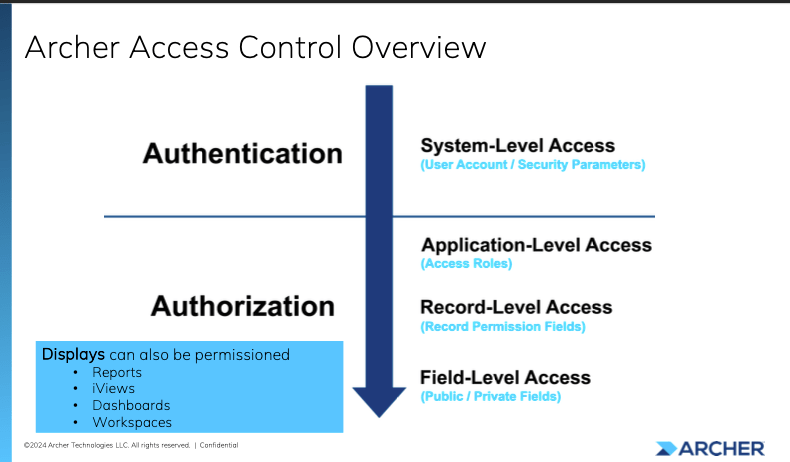
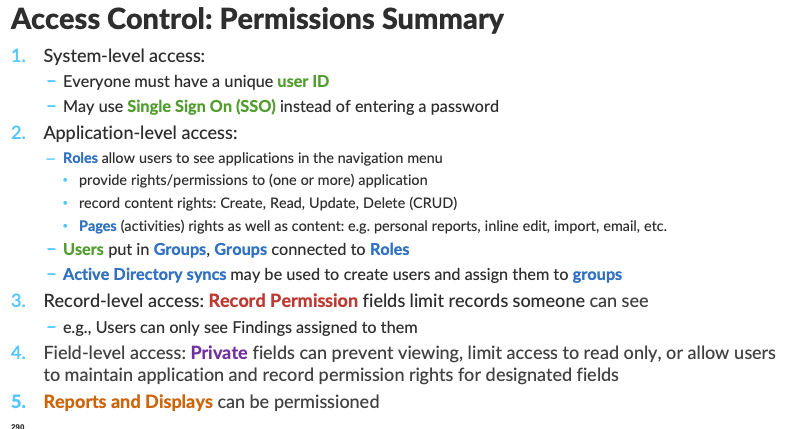
- Common Issues:
- Incorrect role assignments.
- Misconfigured access levels or record permissions.
- Overlapping access rules.
- Remember system level access is authentication for user accounts.
- Solutions:
- Use diagnostic tools to analyze access paths.
- Validate user role and group configurations.
Module 6: Reporting and Communication
- Report Capabilities:
- Advanced search and filter options.
- Dynamic filters for calculated cross-references, record lookups, and report objects
- Scheduling and distribution of reports.
- Searches can be downward or upward
- Best Practices:
- Leverage dashboards for high-level views.
- Automate notifications for key metrics.
General Best Practices:
- System Navigation:
- Familiarize yourself with the modern user interface (left-panel navigation).
- Use dashboards for quick access to reports and data summaries.
- Data Management:
- Always back up data before making significant imports or changes.
- Use staging environments for testing new configurations or workflows.
- Access Control:
- Regularly audit user permissions and access levels.
- Implement least privilege principles to reduce risk.
- Integration:
- Establish clear data mapping and transformation rules.
- Monitor data feeds for errors and adjust configurations as needed.
- Reporting:
- Standardize report templates for consistency.
- Use scheduled distributions to keep stakeholders informed.
Troubleshooting Tips:
- Error Logs:
- Review system logs for detailed error messages.
- Focus on queue statuses for failed imports or feeds.
- Validation:
- Ensure required fields are populated during imports.
- Use test data to validate integration configurations.
- Performance Issues:
- Optimize calculations and avoid unnecessary data processing.
- Regularly review and clean up unused workflows and applications.
This guide provides a high-level summary of the Archer Admin Level II features and processes. For detailed instructions, refer to the platform’s online documentation or the Archer Community resources. I recommend checking out https://help.archerirm.cloud/archer_suite_help/en-us/Content/PortalHome/platform_home.htm for more in-depth explanations for any features within Archer.
 Christopher Sandoli
Leave a comment